Developer docs
MCP server
Connect Claude, Cursor, or any MCP client so your AI can check flight status, list proofs, post new proofs, inspect proof interactions, and read public user proof data.
https://flyinpublic.com/mcp. Transport: HTTP / Streamable HTTP. Auth: Fly in Public OAuth sign-in.Recommended: install the skill
Start with the Fly in Public skill. It tells compatible agents to use hosted OAuth MCP, read the lightweight docs, and avoid API-token setup unless the client cannot support OAuth.
Hosted OAuth client config
Use this against the deployed Worker once OAuth storage is configured. In production, that is https://flyinpublic.com/mcp.
{
  "mcpServers": {
    "flyinpublic": {
      "type": "http",
      "url": "https://flyinpublic.com/mcp"
    }
  }
}
Claude Code CLI
claude mcp add --transport http flyinpublic https://flyinpublic.com/mcpMCP Inspector
npx @modelcontextprotocol/inspector \
  --transport http \
  --url https://flyinpublic.com/mcp
Your client should open a Fly in Public sign-in flow. Sign in and approve the connection.
Claude Desktop connector
Claude Desktop supports custom remote MCP connectors, and a connector added there can also be used from the Claude mobile app after it is connected.
- Open Claude Desktop.
- Go to Settings and open the Connectors tab.
- Click the Add button and then Add custom connector.
- Set Name to
Fly in Public. - Set Remote MCP server URL to
https://flyinpublic.com/mcp. - Click Add, then click Connect.
- Sign in to Fly in Public in the browser window and approve the connection.
- Accept the browser prompt to return to Claude.
- For smoother use, change tool permissions from Needs approval to Always allow.
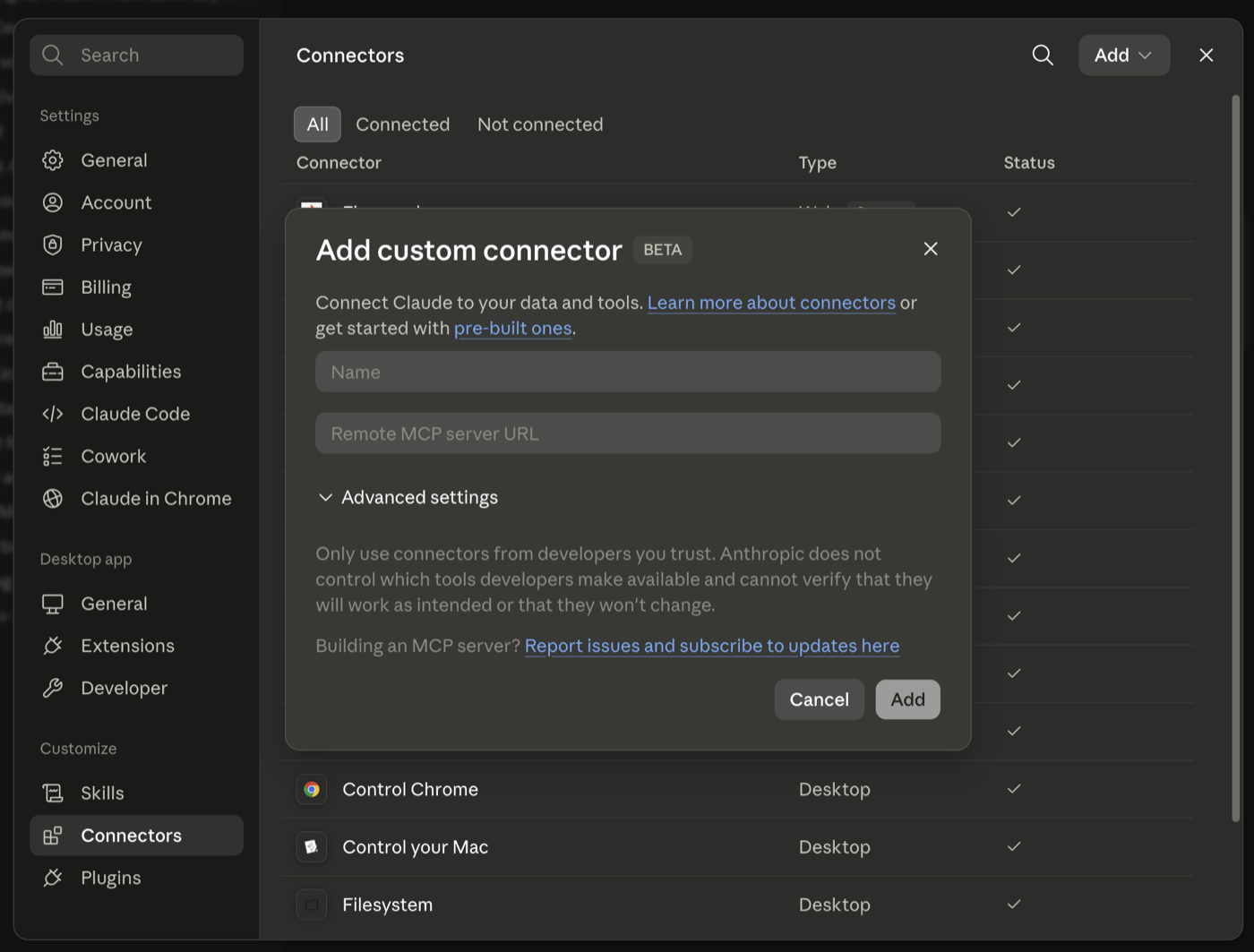
Test it with prompts like "When will my bird crash?", "What are my leaderboard ranks?", or "What did @max post this week?"
Tools reference
Account tools operate on the connected user. Public-read tools accept a public username, never a private user id.
Status tools include altitude in meters for display. Leaderboard rank tools return both tabs: longest flight and highest altitude.
Planning tools (create_planned_proof, list_planned_proofs, update_planned_proof, cancel_planned_proof, complete_planned_proof, link_proof_to_planned_proof) let you plan a future proof calendar conversationally. A planned proof records intent only and does not change altitude until you complete it with a real proof. New planned proofs default to a Telegram reminder 1 hour before due time.
| Tool | Description | Inputs |
|---|---|---|
bird_status | Get your bird's current flight state: altitude in meters, status (flying, grounded, crashed), crash deadline, recent streak, and both leaderboard ranks. | none |
list_proofs | List your most recent proofs (most recent first). Returns id, url, platform, message, publishedAt. |
|
add_proof | Publish a new proof for the authenticated user's flight. The URL is auto-enriched: message, publishedAt, and platform are pulled from the link (X, YouTube, TikTok, Reddit, Open Graph) when not provided. Any field you pass in explicitly overrides the auto-detected value. |
|
leaderboard_rank | Get the authenticated user's leaderboard ranks for both tabs: longest flight and highest altitude. The leaderboard only ranks flights that are currently in the air, so a crashed flight has no rank until it takes off again. | none |
leaderboard_top | Get the top N leaderboard entries for a tab. Only flights currently in the air are ranked. |
|
get_public_user | Get a public user's profile and current flight state by username. Returns only public fields. |
|
list_public_user_proofs | List a public user's proofs, most recent first. Returns only public proof fields. |
|
get_public_proof | Get one public proof by username and proof id. Returns only public proof fields. |
|
list_recent_likes | List the most recent likes on the authenticated user's proofs (since the cutoff). |
|
list_recent_comments | List the most recent comments on the authenticated user's proofs (since the cutoff). |
|
create_planned_proof | Schedule a future proof task (a planned proof). Use this to help the user plan a proof calendar conversationally. A planned proof records intent only: it does NOT change altitude until it is completed with a real proof. New planned proofs default to a Telegram reminder 1 hour before due time; pass reminderAt as null/empty or reminderMinutesBefore as empty to disable it. One platform per planned proof; create separate planned proofs to cross-post. All timestamps are ISO-8601 UTC. |
|
list_planned_proofs | List the authenticated user's planned proofs, ordered by due date. Returns id, description, dueAt, platform, status, reminderAt, and completed proof link. |
|
update_planned_proof | Update fields of a planned proof: description, dueAt, platform, context, reminder, status, sourceTaskId. Status can be set to planned, missed, or cancelled here; to mark completed, use complete_planned_proof so a real proof is created or linked. |
|
cancel_planned_proof | Cancel a planned proof. It stays on record with status cancelled. |
|
complete_planned_proof | Complete a planned proof by publishing a real proof from a URL (auto-enriched like add_proof) or by linking an existing proof id. This publishes/links the real proof and updates flight altitude normally, then marks the planned proof completed and cross-links the two. |
|
link_proof_to_planned_proof | Link a proof the user already published to a planned proof, marking the planned proof completed without creating a new proof. |
|
Example prompts
- "What's my flight status?"
- "When is my bird going to crash, and how much time do I have left?"
- "Add this URL as a proof: https://example.com/post"
- "Show me my last 5 proofs and which one performed best."
- "Who liked my proofs this week?"
- "What did @max post this week?"
- "Show me public proofs from daniel from the last 7 days."
- "Help me schedule next week's proofs around this launch."
- "Mark my planned changelog post done with this URL."
Advanced bearer-token fallback
If your client cannot use hosted OAuth MCP, create an API token from profile settings and use https://flyinpublic.com/api/mcp.
curl -X POST https://flyinpublic.com/api/mcp \
  -H "Authorization: Bearer $FIP_TOKEN" \
  -H "Content-Type: application/json" \
  -d '{"jsonrpc":"2.0","id":2,"method":"tools/list"}'
Call a tool
curl -X POST https://flyinpublic.com/api/mcp \
  -H "Authorization: Bearer $FIP_TOKEN" \
  -H "Content-Type: application/json" \
  -d '{
    "jsonrpc":"2.0",
    "id":3,
    "method":"tools/call",
    "params":{
      "name":"add_proof",
      "arguments":{
        "url":"https://example.com/post",
        "message":"Shipped today!"
      }
    }
  }'
Troubleshooting
- OAuth does not open: confirm your client supports remote HTTP MCP with OAuth.
- 401 Unauthorized on advanced MCP: token missing or revoked.
- 404 Not Found: use exactly
https://flyinpublic.com/mcporhttps://flyinpublic.com/api/mcpand POST. - no_project: visit the dashboard once to create your flight.
- Proof calls succeed but proofs do not appear: check that
publishedAtis not in the future and the URL is not already attached.